
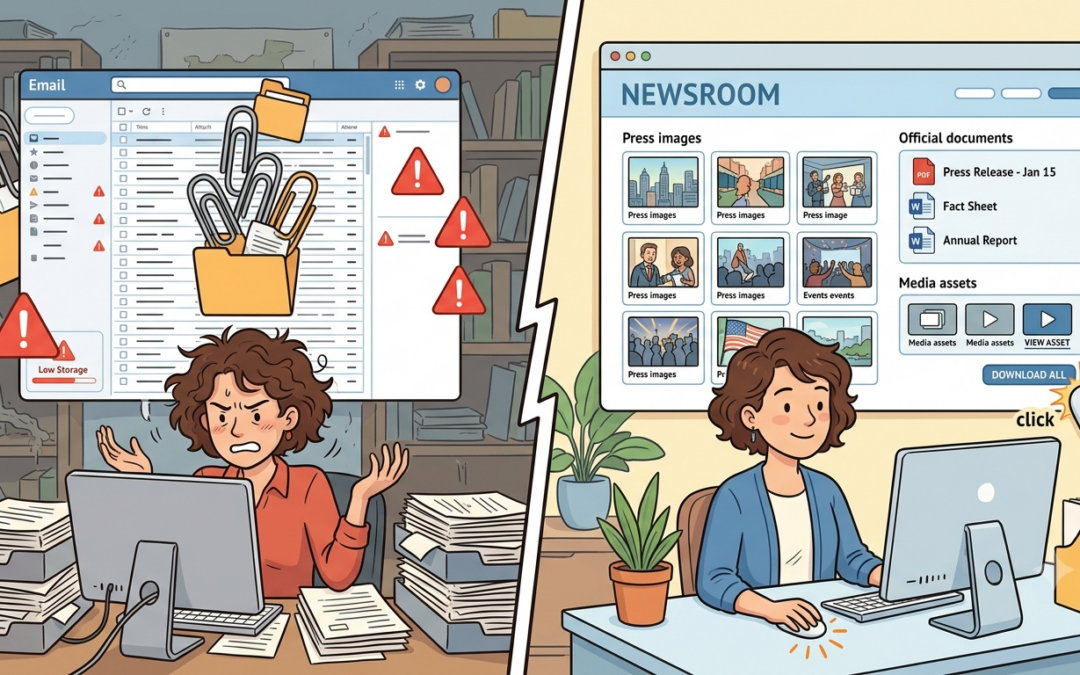
When an image is attached to a press release, the method of delivery often determines whether the images can be processed at all. Sent as an attachment, the file may exceed the mail server’s size limit or increase the spam score. Embedded directly in the email body, how it appears depends on the recipient’s email client. And a link to cloud storage often looks suspicious to spam filters and is anything but a reliably permanent source.
So there is no single perfect way to send images, but there is one solution that is significantly more reliable than all the others: a central newsroom. This article shows the best way to deliver images in press releases, the pitfalls of attachments and cloud links, and why the PressFile Newsroom is the safest and most effective solution.
Why image size matters in press releases
Outlook shows the image cropped, Gmail doesn’t load it at all, and on a smartphone it looks huge. Anyone who embeds images in press releases knows the problem. The reason is usually not the image itself, but the fact that every email client handles images differently.
No two email clients are alike
Outlook, Apple Mail, Gmail, Thunderbird, or the email app on a smartphone display emails differently. What looks clean and centered in Outlook can appear cropped in Gmail or show up at the wrong size in Apple Mail. Images are not automatically scaled consistently. Some clients display them at their original size, while others adapt them to the width of the window.
The reason lies in the technical implementation. Emails are written in HTML, but each client renders that HTML according to its own rules. While browsers like Chrome or Firefox largely follow consistent standards, there is no comparable standardization among email clients. Outlook, for example, still uses the Word rendering engine to this day, which means many modern CSS properties are simply ignored. Gmail strips certain style attributes from the code before displaying the email. Apple Mail sometimes automatically scales images to the available width. On top of that, many clients block external images by default for privacy and security reasons until they are manually allowed.
The sender cannot control which email client the editor on the other side uses. What you can control, however, is how the image material is prepared—size, format, and embedding. This is exactly where it is decided whether an image is displayed cleanly for all recipients or not.
What editors really need
Editors receive dozens of press releases every day. In editorial work, where decisions are made quickly, what matters most is direct access to all relevant content. Images that first have to be downloaded via a cloud link or extracted from an attachment take time—time that is often not available in day-to-day editorial work.
This is exactly where the advantage of a central newsroom lies. Editors find the press text, images, documents, videos, and the contact details of the responsible contact person in one place—available with a single click and without any extra effort.
When does an image become a deliverability problem?
Anyone who sends images as attachments risks both rejection by the receiving mail server and a poorer rating by spam filters. Many receiving mail servers also set size limits for incoming emails, and the available storage on the recipient’s side is not unlimited either. If the mailbox is full or the file limit is exceeded, the email is simply rejected—often without the sender ever finding out.
The spam score should not be underestimated. Attachments and large image files increase the risk that an email will be classified as suspicious by spam filters. As already described in our blog post No more Word documents: Why attachments fail, sometimes a single attachment is enough for a message not to reach the inbox.
Embed online instead of attaching
If you do not want to send images as attachments, you will often embed them directly in the email body as online images—via a URL that is loaded when the message is opened. This keeps the email lean, avoids issues with file size limits, and ensures images are visible directly in the text without the recipient having to download anything. Technically, this works via an img tag that points to a URL where the image is permanently accessible. If the image is later moved or deleted, however, only an empty field or an error icon will appear in its place.
Even a simple link to cloud storage is not a reliable solution. Such links often generate long, cryptic-looking URLs that spam filters rate critically. There is also the risk that the link will stop working at some point, or that the domain does not match the sender and thus negatively affects the email’s spam score.
Whether an online embedded image is displayed cleanly depends not only on where it is hosted, but also on how it was prepared. Most email clients display emails in a viewing area that, depending on window size and client, is between 500 and 700 pixels wide. At 600 pixels wide, you hit a middle ground that is displayed in the most common clients without horizontal scrolling and remains easy to read on mobile devices. Images wider than 600 pixels are cropped by some clients or force unwanted scrolling. Images that are too narrow often look unfinished and lose impact.
But file size also plays a role. Even online embedded images should be compressed, as they have to be loaded when the email is opened. A compressed JPEG or PNG of a few hundred kilobytes loads much faster than an uncompressed file of several megabytes, which is especially noticeable on mobile connections. If a press release goes to a large distribution list and many editors access the linked image area at the same time, this can temporarily overload the web server. A dedicated newsroom, for example, is designed for such load peaks and offers significantly more reliable availability.
The newsroom as a content hub
The term content hub describes a central place where all relevant content for a press release is permanently and clearly available in a structured way. Press text, images, PDFs, videos, documents, and the contact details of the responsible contact person—all in one place, available with a click. The complete package can be downloaded as a ZIP file, so the full set of image material is always available in one bundle. For editors, that means no detours, no extra effort, and direct access to everything they need.
The PressFile Newsroom provides a solid foundation for the professional provision of press materials. All elements—from the headline and images to documents, the text, and the responsible contact person—are compiled and published in a single step. In the newsroom, you can see at a glance how many images and documents belong to a release. The images are accessible via a stable, trustworthy URL and can be embedded directly into the email body. If you also need an extensive media library, you can make all media assets such as press photos, graphics, audio, and video files available online. Editors can independently select from the media content, and an image similarity search instantly delivers additional matching motifs.
If you are looking for an even more customized solution beyond the standard newsroom, you have the option of commissioning a newsroom that is fully tailored to your requirements. It can be designed with your own logo, your own domain, and a fully custom design—aligned with the company’s or agency’s corporate design. In terms of content, there are hardly any limits. Press texts, images, graphics, videos, audio files, and documents can be provided in a structured, clear way and categorized by various criteria such as topic, date, or media format.
Such a newsroom exists as a standalone platform independent of the company website, but can easily be linked from there or integrated into the existing web presence. This gives editors a professional, always-accessible place where they can independently access all relevant content without follow-up questions. Images can be downloaded directly, press texts can be processed immediately, and contacts can be found at a glance. This saves time, avoids follow-up questions, and makes working with press materials much more pleasant. The content continues to be maintained and published directly via PressFile, so the newsroom remains firmly integrated into the familiar workflow.
This keeps the email lean, the images are immediately visible in the right size, and additional image material is available at any time via a stable, trustworthy link. If you want to send press releases effectively, you can hardly avoid a well-thought-out image strategy.
The image used was generated with the help of Google Gemini.